We have upgraded our website - live 27th Sep 2026 onwards.

Remote MYSQL connecton

Updated 27 Sep 2026 1,454 views 1 found this helpful

In order to connect MYSQL database remotely (on local machine or other servers), you are required to add IP to the allowed list. By default cPanel will only allow databases connectivity from within the server (for security).

In order to connect MYSQL databases remotely, please follow the steps below:

  • Login to cPanel
  • Go to Remote MySQL option
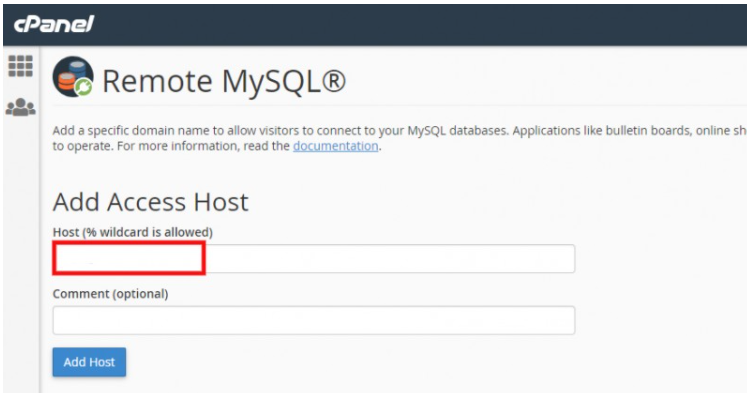
  • Put in the IP address in the Add Access Host, optional comments can be added for reference
2_6183de4d0f66b_2_1636123177.png

  • Click Add Host to allow the IP

Please note, all databases within the account will be accessible to the IPs added - IP access cannot be added for databases separately.

Was this article helpful?

Your vote helps us decide which guides to improve next.

Still need help?
WhatsApp supportReal people, 24×7, Urdu or English.0300-8236650 → Open a ticketTracked in your client area with email updates.Submit a ticket → Frequently asked questionsOrdering, payments, activation and SSL answers.Read the FAQs →

TALK TO US

Message us. A person replies.

No ticket queue, no bot. WhatsApp, email or a phone call to Karachi — in Urdu or English.

Start with a name.
Be online before lunch.

Free SSL, free migration, 30 days to change your mind. Join 10,000+ Pakistani businesses.

or browse hosting plans