cPanel has built in option to generate full account backup (including all website files, emails and databases). The backup generated be used as a fail case backup and also if you want to transfer your website to other server or a different hosting provider.
Here are the steps you can follow to generate full cPanel backup:
- Login to cPanel
- Go to backup option
- Click download full website backup
- You will see list of all backups created to date (if you had requested before)
- If you want to initiate a fresh backup select;
- Backup destination (default is a home directory)
- And add email to be notified to once the backup has been created (time duration will vary based on the size of the account)
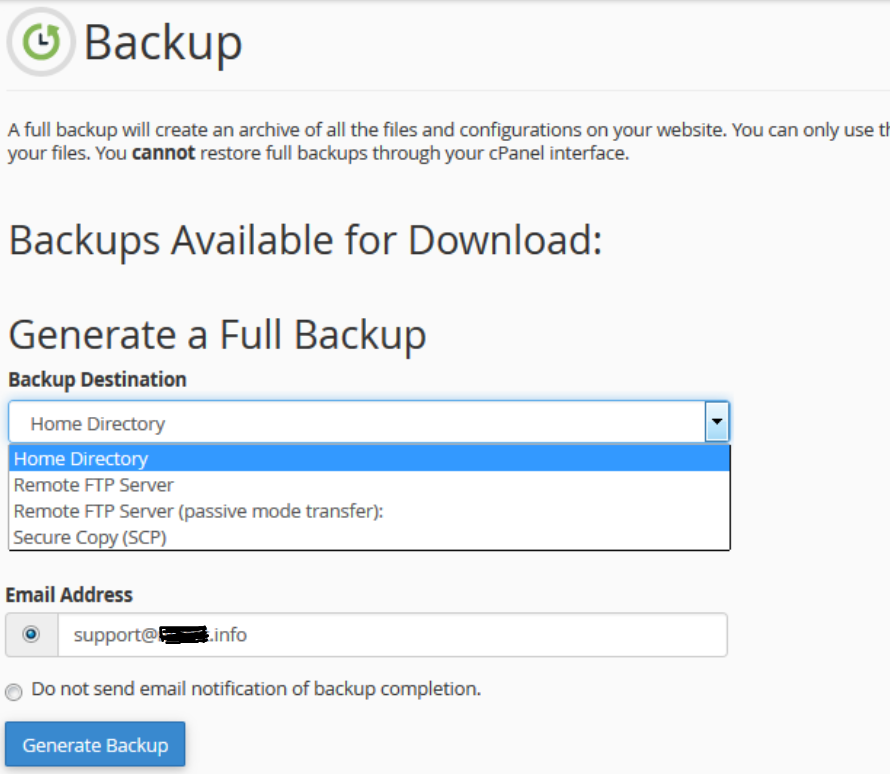
- Once the backup is generated, you will see it in the list of available backups to download on the above page.
Best practices for keeping your website backup secure:
- Once your backup is generated, download an store it in a secure/external space. Generating and keeping the backup on the same server will not help, as in the case of server failure the backup will be lost too. Some users prefer to keep it on their Gdrive or Dropbox.
- Once the backup has been downloaded, please delete it from your home directory. Even though home directory is not publicly available, it is better to keep it off the server only because;
- Keeping backups on server will use your available disk space
- Your team members with FTP access can download it, that will give them access to backup emails and databases as well
- Mistakenly moving the file in public directory will expose your backup to public
Please note, despite all the web hosting providers do their best to keep customer's data secure. It is always advised to customers to keep their own backup so they can avoid loosing data in the case of any failure.
Was this article helpful?
Your vote helps us decide which guides to improve next.